捡到一台没人要的NAS,折腾一下。
SSL 相关
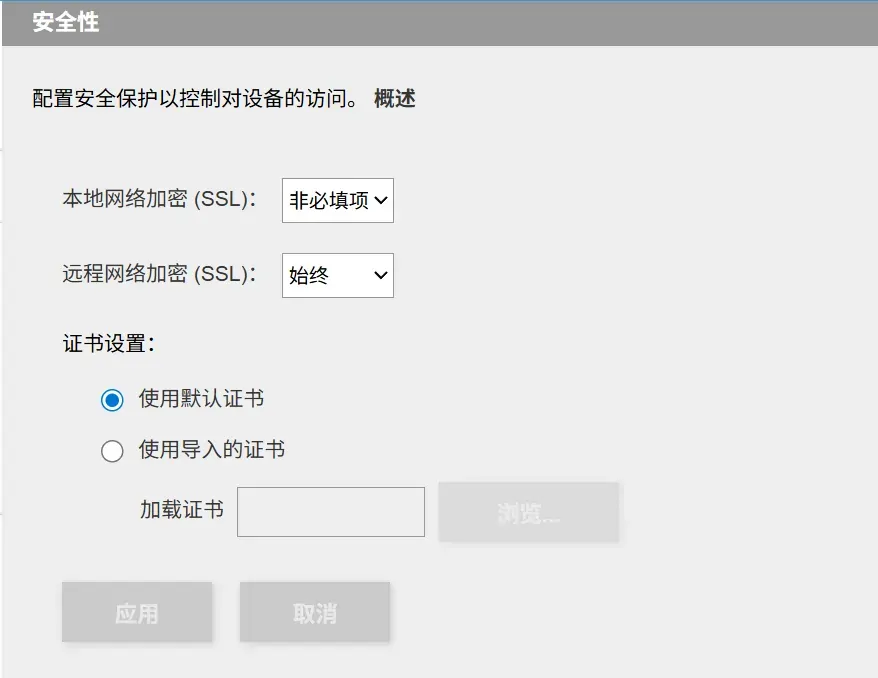
如果本地网络强制 SSL 的话,下载会出现证书的报错。
SHELL
这台机器还是能开 SHELL 的。
访问 IP/manage/diagnostics.html 就可以开启隐藏起来的 SHELL。
默认账号是 root ,密码则是 soho+密码。
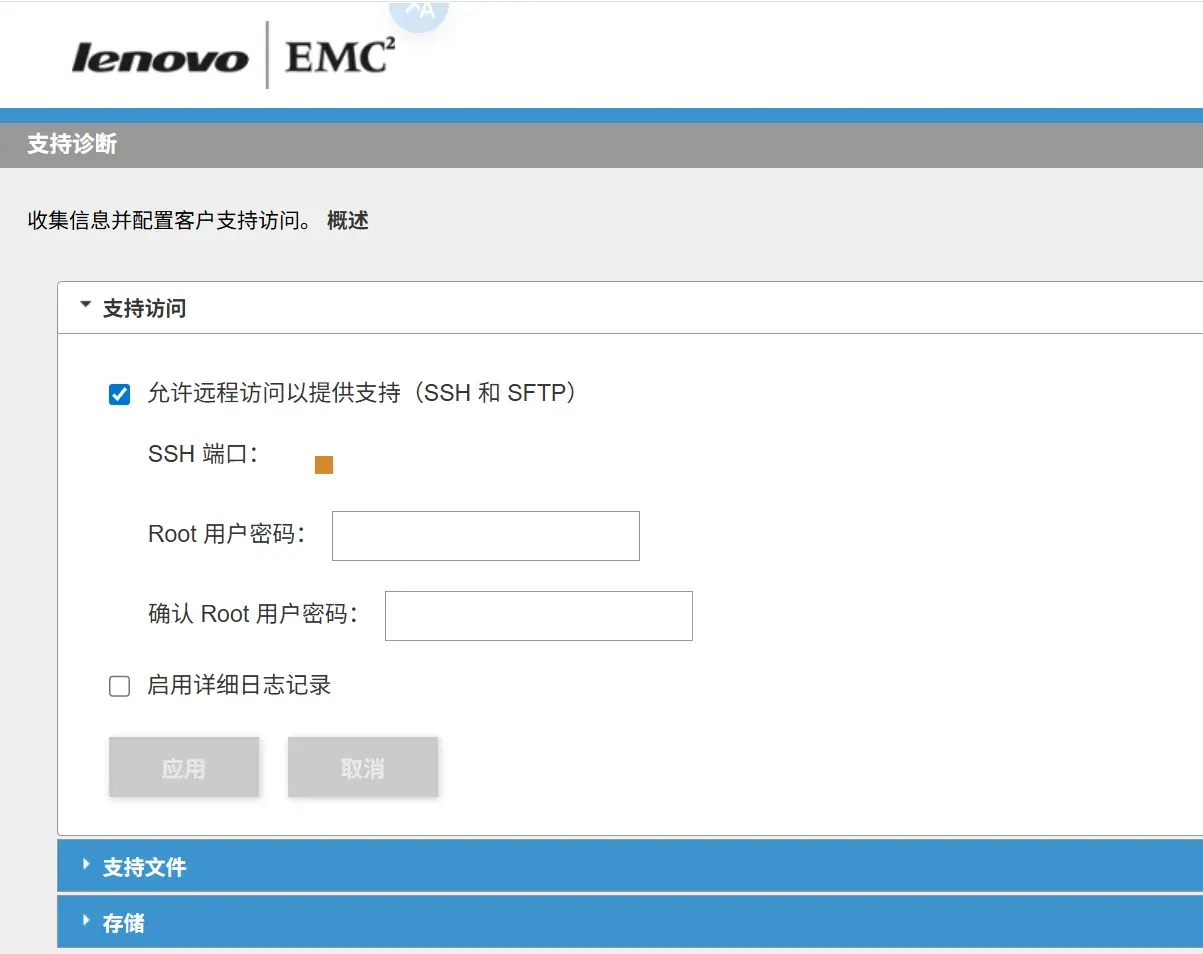
进入 shell 后的一些配置
第一步是看配置和内核还有内存。
1
2
3
| cat /proc/cpuinfo
uname -a
free -m
|
登录校园网 Drcom校园网使用路由器过验证 - Chifan’s Blog
安装包管理器,这里就安装了 opkg wget -O - http://bin.entware.net/x64-k3.2/installer/generic.sh | sh。
下载 neofetch,因为内核太老了没有需要的 libc。下载的都是二进制的 musl 版本。
一些不是单纯的二进制文件比如说 openlist 可以将其放在 /opt/apps 里面,然后使用软链接 ln -s 将二进制放在 /opt/bin 里面方便管理。
 1
 2
 3
 4
 5
 6
 7
 8
 9
10
| vi /etc/profile
export PATH=/opt/bin:/opt/sbin:$PATH
export LANG=en_US.UTF-8
neofetch
alias ls='ls --color=auto'
alias grep='grep --color=auto'
alias ll='ls -lah --color=auto'
export PS1='\[\e[32;1m\]\u@\h\[\e[0m\]:\[\e[34;1m\]\w\[\e[0m\]\$ '
|
换 shell
1
2
3
| which shell
chsh
/bin/bash
|
MONIT
这台 NAS 的内核版本太低了,不支持 systemd 管理服务。
但是可以使用 init.d ,写脚本放在 /opt/etc/init.d/ 目录下,开机就会自动运行。但是没办法再服务死亡的死后自动拉起。
好在 opkg 里面有 monit 可以管理,能够管理服务。opkg install monit
 1
 2
 3
 4
 5
 6
 7
 8
 9
10
11
| monit -t # 配置文件检测
monit # 启动
monit daemon monit -c /var/monit/monitrc # 启动monit daemon时指定配置文件
monit reload # 当更新了配置文件需要重载
monit status # 查看所有服务状态
monit status nginx # 查看nginx服务状态
monit stop all # 停止所有服务
monit stop nginx # 停止nginx服务
monit start all # 启动所有服务
monit start nginx # 启动nginx服务
monit -V # 查看版本
|
vi /opt/etc/monitrc
 1
 2
 3
 4
 5
 6
 7
 8
 9
10
11
12
13
14
15
16
17
18
19
20
21
22
23
24
25
26
27
28
29
| # 监控名为 openlist 的进程
check process openlist matching "openlist server"
# 启动命令
start program = "/bin/sh -c 'cd /opt/apps/openlist && /opt/bin/openlist server >> /opt/var/log/openlist.log 2>&1'"
# 停止命令
stop program = "/usr/bin/pkill openlist"
if failed port 5244 then restart
if 3 restarts within 5 cycles then unmonitor
# 监控 FileBrowser 进程
check process filebrowser matching "filebrowser -d"
# 启动命令
start program = "/bin/sh -c '/opt/filebrowser/filebrowser -d /opt/filebrowser/filebrowser.db -a 0.0.0.0 -p 8080 >> /opt/var/log/filebrowser.log 2>&1'"
# 停止命令
stop program = "/usr/bin/pkill filebrowser"
if failed port 8080 then restart
if 3 restarts within 5 cycles then unmonitor
# 校园网登录脚本
check host campus_network with address baidu.com
start program = "/opt/bin/route.sh"
stop program = "/usr/bin/pkill -f route.sh"
if failed ping then restart
every 2 cycles
# IP检测脚本
check process ip_report matching "ip.sh"
start program = "/bin/sh -c '/opt/bin/ip.sh &'"
stop program = "/usr/bin/pkill -f ip.sh"
|
持久化
为了能让机器重启时先启动 monit ,然后再由 monit 拉起其他服务,需要持久化。
vi /etc/rc.local 在 exit 0 前加入 /opt/bin/monit -c /opt/etc/monitrc 。
远程通知
为了避免有一天突然断电重启,重新分配 IP,又要去机房看一眼 IP 的问题,就需要一个脚本能够持续发送 IP。
本来是打算将通知发送到 tgbot 上面的,依旧是用自建的 Cloudflare worker 中转一下就可以了。
但是机房的网络比较特别,好像是对于国外的 IP 都禁止发起连接。包括 Tailscale 和 Cloudflare 的所有 IP。所以我下载 GitHub 上面的二进制文件都是用的香港的加速才能成功。
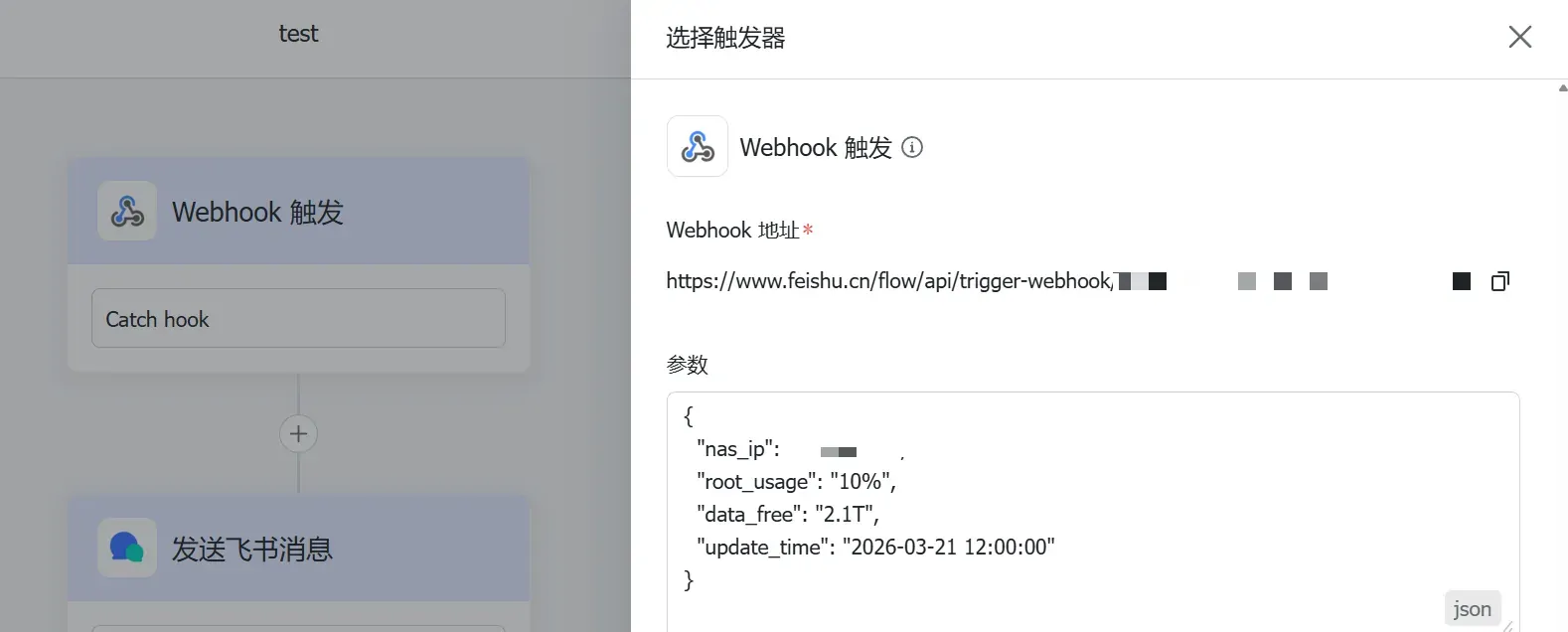
最后是选择用飞书的 bot。
 1
 2
 3
 4
 5
 6
 7
 8
 9
10
11
12
13
14
15
16
17
18
19
20
21
22
23
24
25
26
27
28
29
30
31
32
33
34
| #!/bin/sh
# === 配置区 ===
WEBHOOK_URL="https://www.feishu.cn/flow/api/trigger-webhook/"
# 发送间隔(秒),例如 3600 代表 1 小时
INTERVAL=10
# ==============
export PATH=/opt/bin:/opt/sbin:/usr/bin:/usr/sbin:/bin:/sbin
while true; do
# 1. 获取校园网内网 IP
MY_IP=$(ip addr show | grep 'state UP' -A2 | grep 'inet ' | grep -v '127.0.0.1' | awk '{print $2}' | cut -f1 -d'/')
# 2. 获取根目录 (/) 的占用情况
ROOT_USAGE=$(df -h / | awk 'NR==2 {print $5}')
# 3. 获取数据盘 (/mnt/pools/A/A0) 的剩余空间
DATA_FREE=$(df -h /mnt/pools/A/A0 | awk 'NR==2 {print $4}')
# 4. 获取系统当前时间
NOW=$(date "+%Y-%m-%d %H:%M:%S")
# 5. 构造 JSON 数据包
PAYLOAD=$(printf '{"nas_ip":"%s", "root_usage":"%s", "data_free":"%s", "update_time":"%s"}' \
"$MY_IP" "$ROOT_USAGE" "$DATA_FREE" "$NOW")
# 6. 发送请求
curl -s -k -X POST "$WEBHOOK_URL" \
-H "Content-Type: application/json" \
-d "$PAYLOAD" > /dev/null
sleep $INTERVAL
done
|
如果想要 IP 发生改变再执行发送一次消息可以添加一个上一次 IP 和此刻 IP 对比的判断。
因为这个不好安装探针,我看着连续的通知比较放心,可以容易判断出什么时候出现问题。掉线的情况。

参考
- Monit:开源服务器监控工具 - 飞鸿影 - 博客园